Wednesday, 23 December 2015

// // Leave a Comment

Lenovo K4 Note launch set for January 5, invites sent out.................

Lenovo K4 Note launch set for
January 5, invites sent out
The Lenovo K3 Note has set the benchmark for sub Rs 10,000 phones in the country and has been one of the most popular in this price segment. As per Lenovo, the company has managed to sell 1.2 million units of K3 Note in the June to Nov period.

Thanks to all this, there is already a great hype around the successor of this phone. Thankfully, we will not have to wait long to meet the same in glass and plastic. The company has now sent out an invite teasing the release of what we believe is Lenovo K4 Note. The company released an identical teaser last week as well, but this one here comes with details on the launch, timings, location etc.

Naturally, there's very little that we know about the handset at this point, but we hope for the leaks to clarify our doubts as we lead up to the release of the device. Pricing will obviously be a key selling point here and we can expect Lenovo to leave no stone unturned in making this a capable successor to the K3 Note.

It has been rumored that the Lenovo K4 Note will come with a fingerprint scanner, along with beefed up specs like 3GB of RAM and 32GB of internal storage, both more than what's found on the K3 Note.

Other details like the processor, camera, display size etc are still a secret at this point, although one can speculate that the device would pack a premium looking exterior, perhaps with a metal body.

The smartphone is going to be a significant upgrade over the successor, so we can expect the handset to be an attractive proposition in the budget market segment.
Read More

Tuesday, 22 December 2015

// // Leave a Comment

BlackBerry to consider a mid-tier Android phone if the Priv is a success...........

The BlackBerry Priv, the company’s first Android smartphone, marked a new page in BlackBerry’s history and the handset could just be the start of a longer chapter. In a recent interview, BlackBerry CEO John Chen stated that the company will consider moving into the mid-range Android market as well, providing that the Priv is seen as a success.
Chen stated that the Priv’s results over the next three to four months are going to be key when determining what the company does next. Chen mentioned that he’s looking at results for the Priv in terms of margin and not necessarily just in terms of sales volume.
If the Priv is well received, and Chen seems rather optimistic that the phone is on the right track, BlackBerry will consider developing a new mid to high end smartphone that could launch sometime in the 2016 calendar year. We are probably looking at a launch in the later half. A low cost smartphone from BlackBerry seems rather unlikely, but its next handset could take the form of the reasonably priced “super-mid” tier of products that have become increasingly popular in Asia and Europe.
blackberry-priv-thumb

When questioned about a further hardware partnership with Samsung, which manufactures the AMOLED display for the Priv, Chen insisted that the two companies continue to work together but don’t have any confirmed long running deals for physical product development. However, the two continue to run joint products in the security space and with Samsung’s Knox products for mobile.
BlackBerry looks to be taking its mobile strategy just one quarter at a time and isn’t making any long term commitments. Given the competitive nature of today’s mobile market, this strategy may pay off.
PROS
Design is sleek despite the extra hardware
Physical keyboard is a throwback but still useful
Display is high quality
Expandable storage
Front facing speaker
BlackBerry's version of Android is full featured and fun to use
CONS
Overall build quality just a little bit questionable
Snapdragon 808 bogged down by lack of software polish
Camera missing a lot of features and lacks in processing, aggressively decent
No fast charging
Battery life only slightly above average, despite size of unit
BlackBerry's own apps need to be updated for current needs
RATING
OUR RATING
BATTERY
7.5
DISPLAY
8.5
CAMERA
6.5
PERFORMANCE
8.0
SOFTWARE
8.0
DESIGN
7.7

Read More

Sunday, 20 December 2015

// // Leave a Comment

Photo Magic and snow globes come to Facebook Messenger......

Photo Magic and snow globes come to Facebook Messenger
Facebook Messenger is rolling out new features to celebrate the holidays, including its instant-photo sharing feature, Photo Magic.
The social media giant first introduced us to Photo Magic last month, when it was still in testing. Photo Magic uses facial recognition smarts whenever you take a photo to remind you to share photos with the friends or family in the snapshot.
It can also automatically tag them as well as set up a private group chat with the people in the image, letting you send them the picture with just a couple of clicks.

Holidays are about sharing

While the Photo Magic update is rolling out to Messenger for Android and iOS this week, if you don't want this feature popping up every time you take a picture, you can disable it. You can decide if you want it to recognize you in photos taken by your friends and family as well.
The new update also bring more customization options to Messenger, including adding colored text, emojis and nicknames to separate message threads.
For group threads, everyone can change around these customizations, and you'll get a notifications each time a change is made - which we're sure won't get annoying.
You also get snow globe heads on Android and a shower of snow flakes whenever you send a holiday-themed emoji on either operating system, even if you're in warmer climes.
  • CES 2016 is nearly here
Read More
// // Leave a Comment

Galaxy S7 could finally get an awesome version of TouchWiz....


Galaxy S7 could finally get an awesome version of TouchWiz
Samsung phones could become more refined and faster if the mooted tie-up with Google to make its software sleeker goes ahead.
Touchwiz, Samsung's overlay for a number of years (including before Android emerged), has been criticised for being too resource-heavy and cartoonish, despite recent attempts by the South Korean firm to improve it in recent years.
So to try and improve things it's reported that Google is now working directly with Samsung to achieve a "non-delayed operating experience" with "greater fluency than iOS".
There's sadly no word on when this could appear, so it's uncertain whether any partnership might bear fruit by February when we're expecting the new Samsung Galaxy S7.
Similar rumours about a tighter partnership in November suggested that RAM management is a particular bugbear - with TouchWiz still causing problems even on Samsung's most high-spec devices.

Teamwork

One of the reasons that iPhones tend to have (on paper) less impressive specs yet run just as speedily is because Apple's hardware and software teams can work closely together to make sure the two work together as efficiently as possible.
For Android devices, this is obviously more tricky given the wider range of hardware, and the fact that hardware and software are made by different manufacturers. So getting a little closer makes a lot of sense for both Google and Samsung.
It also helps that Google's engineers will know the Android operating system inside out, so will know where optimisations for TouchWiz can be made.
Some people would rather see Samsung junk TouchWiz and stick with Google's own reliable user interface, but that would take away another layer of identity in a world where these brands are trying to stand out from Android homogeneity.
  • Our review of the Samsung Galaxy S6 Edge.
Read More
// // Leave a Comment

The Sony Xperia Z6 could be the phone we've all been waiting for ......coming soon in june

The Sony Xperia Z6 could be the phone we've all been waiting for
Sony has stuck with it's boxy, bezel heavy design for years now - but we could finally be about to get a new chapter.
It's been all 'Omnibalance' for years, the current mix or metal edges and glass backs, but the company's smartphone fortunes have hardly been illustrious worldwide, so a change is needed.
According to a source speaking to cnBeta the Sony Xperia Z6 will have a new design, with metal playing a major role.
That would be good news, as Sony's current design, as seen on the Sony Xperia Z5, is getting a little tired.

Churning them out

That's not all that's been revealed though. According to the same source Sony will launch two new flagships next year. The first, which will presumably be the Xperia Z6, is set to land in June, with another, possibly the Xperia Z7, arriving in October.
That's a similar (ish) schedule to what the company is on now and flies in the face of earlier rumours that it would switch to one flagship launch each year. It would also mean we won't see any new Sony flagships at CES 2016 or MWC 2016.
While things may get freshened up with a new design on the Z6 it sounds like the Z7 could be just a small upgrade, with both phones apparently set to use a Snapdragon 820 processor.
For now, these are nothing more than rumours, but hopefully at least the redesign one ends up being true.
  • Sony's most premium phone yet isn't its best.
Read More
// // Leave a Comment

Jet Audio Music Player for Android users............

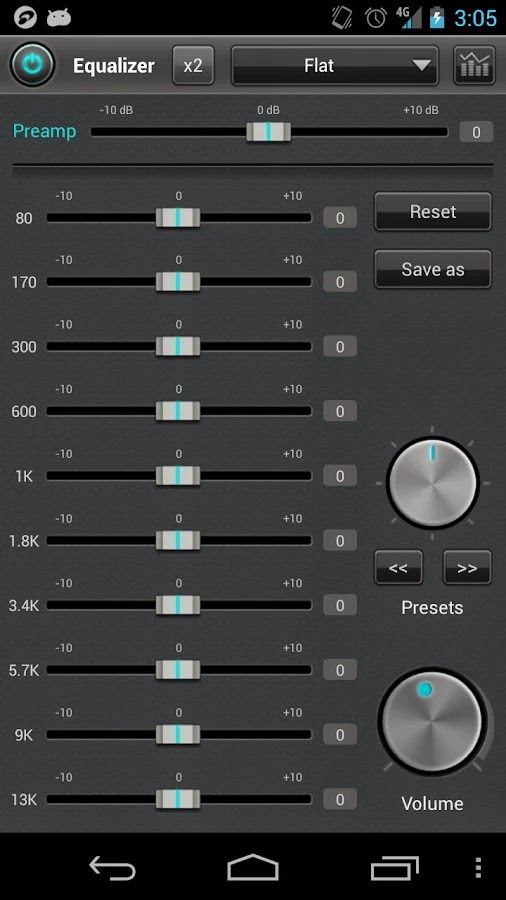
jetAudio Music Player+EQ Plus v6.3.0 Patched

jetAudio Plus is a mp3 music player with 10/20 bands graphic equalizer and various sound effects.
*** You can try FREE jetAudio Basic before you buy Plus version ***

-- Sound Effects plugins --
* AM3D Audio Enhancer (http://www.am3d.com)
* Bongiovi DPS (http://www.bongioviacoustics.com)
(Sound effect plugins will be sold separately through in-app purchase.)
(Some plugins can be purchased in Plus version only.)

jetAudio for Windows is the highest rated and most downloaded media player on CNET.COM and now you can listen to same high-quality sound on your Android phone using jetAudio.
It plays almost any type of digital music files you have (.wav, .mp3, .ogg, .flac, .m4a, .mpc, .tta, .wv, .ape, .mod, .spx, .wma* and more) and, it provides a very high quality sound with various effects and enhancements such as Wide, Reverb, X-Bass.

It comes with 32 equalizer presets that will provide a wide array of listening experience.
For those who would like to customize their own sound experience, it also allows 10/20 bands graphic equalizer and other advanced playback functions including playback speed control,
crossfading, AGC and much more.

Free Basic version provides same features with Plus version except advertisements and some features.
To enjoy full features of jetAudio, please purchase Plus version.

-- Features for Plus version only --
* 20-bands graphic equalizer
* Tag Editor (MP3, FLAC, OGG, M4A)
* Display lyrics in tag (Unsynchronized lyrics)
* 2 lock screens
* 14 app widgets : 4x1 (#2), 4x2 (#3), 4x3 (#3), 4x4 (#3), 3x3, 2x2, 2x3
* Pitch shifter
* Precise playback speed control (50% ~ 200%)
* Light Gray/White theme for browser (Plus only)
* Grid mode for Artist/Song/Folder/Genre browser
* Adjust FF/REW interval
* Expanded notification bar (for JB)
* MIDI playback (using jetAudio WaveTable MIDI synthesizer engine)

-- Features for Basic/Plus version --
* Can choose between 3 List modes or 10 Grid modes for layout style
(In Basic version, layout style can be chosen in Album browser only)
* Find on YouTube
* Last.fm (requires official Last.fm app)
* X-Wide, Reverb, X-Bass sound effects
* AGC (automatic gain control) to avoid volume fluctuations between tracks
* Speed control from 50% to 200% (pitch adjusted)
* Crossfading, Gap-less playback
* Fade-in/Fade-out
* Repeat A<->B
* Browser and play music by artits, albums, songs, playlists, genres and folders
* Balance/Volume control
* Sleep timer up to 24 hours
* Flick up to post what you're listening to on Facebook/Twitter
* Flick down to show Now Playing
* Flick left/right to play next/previous
* Lock screens
* Headset button control (Bluetooth headset)
- press to pause/resume
- double/triple press to play next/prev
- long press to mute or TTS (time, title)
* Bluetooth headphone button control
* Send track information via Bluetooth AVRCP 1.3
* Multi-select function (Delete/Add to playlist)
* Keep screen on, Lock orientation options
* Shake to play next/previous track
* Supporting formats:
MP3, WAV, OGG, FLAC, M4A, MPC, TTA, WV, APE, MOD (module formats S3M, IT), SPX, AIFF
(WMA may not be supported on some devices. Please check your device specification for WMA support)

What's New
v6.5.2
- Bug fixes

jetAudio Music Player+EQ Plus v6.3.0 PatchedjetAudio Music Player+EQ Plus v6.3.0 Patched

jetAudio Music Player+EQ Plus v6.3.0 Patched

jetAudio Music Player+EQ Plus v6.3.0 PatchedjetAudio Music Player+EQ Plus v6.3.0 Patched

Read More
// // Leave a Comment

Password storage in Android M

While Android has received a number of security enhancements in the last few releases, the lockscreen (also know as the keyguard) and password storage have remained virtually unchanged since the 2.x days, save for adding multi-user support. Android M is finally changing this with official support for fingerprint authentication. While the code related to biometric support is currently unavailable, some of the new code responsible for password storage and user authentication is partially available in AOSP's master branch. Examining the runtime behaviour and files used by the current Android M preview reveals that some password storage changes have already been deployed. This post will briefly review how password storage has been implemented in pre-M Android versions, and then introduce the changes brought about by Android M.

Keyguard unlock methods

Stock Android provides three keyguard unlock methods: pattern, PIN and password (Face Unlock has been rebranded to 'Trusted face' and moved to the proprietary Smart Lock extension, part of Google Play Services). The pattern unlock is the original Android unlock method, while PIN and password (which are essentially equivalent under the hood) were added in version 2.2. The following sections will discuss how credentials are registered, stored and verified for the pattern and PIN/password unlock methods.

Pattern unlock

Android's pattern unlock is entered by joining at least four points on a 3×3 matrix (some custom ROMs allow a bigger matrix). Each point can be used only once (crossed points are disregarded) and the maximum number of points is nine. The pattern is internally converted to a byte sequence, with each point represented by its index, where 0 is top left and 8 is bottom right. Thus the pattern is similar to a PIN with a minimum of four and maximum of nine digits which uses only nine distinct digits (0 to 8). However, because points cannot be repeated, the number of variations in an unlock pattern is considerably lower compared to those of a nine-digit PIN. As pattern unlock is the original and initially sole unlock method supported by Android, a fair amount of research has been done about it's (in)security. It has been shown that patterns can be guessed quite reliably using the so called smudge attack, and that the total number of possible combinations is less than 400 thousand, with only 1624 combinations for 4-dot (the default) patterns.

Android stores an unsalted SHA-1 hash of the unlock pattern in /data/system/gesture.key or/data/system/users/<user ID>/gesture.key on multi-user devices. It may look like this for the 'Z' pattern shown in the screenshot above.

$ od -tx1 gesture.key
0000000 6a 06 2b 9b 34 52 e3 66 40 71 81 a1 bf 92 ea 73
0000020 e9 ed 4c 48

Because the hash is unsalted, it is easy to precompute the hashes of all possible combinations and recover the original pattern instantaneously. As the number of combinations is fairly small, no special indexing or file format optimizations are required for the hash table, and the grep and xxd commands are all you need to recover the pattern once you have the gesture.key file.

$ grep `xxd -p gesture.key` pattern_hashes.txt
00010204060708, 6a062b9b3452e366407181a1bf92ea73e9ed4c48

PIN/password unlock

The PIN/password unlock method also relies on a stored hash of the user's credential, however it also uses a 64-bit random, per-user salt. The salt is stored in the locksettings.db SQLite database, along with other settings related to the lockscreen. The password hash is kept in the /data/system/password.key file, which contains a concatenation of the password's SHA-1 and MD5 hash values. The file's contents may look like this:

$ cat password.key && echo
2E704465DB8C3CBFF085D8A5135A6F3CA32D5A2CA4A628AE48E22443250C30A3E1449BD0

Note that the hashes are not nested, but their values are simply concatenated, so if you were to bruteforce the password, you only need to attack the weaker hash -- MD5. Another helpful fact is that in order to enable password auditing, Android stores details about the current PIN/password's format in the device_policies.xml file, which might look like this:

<policies setup-complete="true">
...
<active-password length="6" letters="0" lowercase="0" nonletter="6" 
                 numeric="6" quality="196608" symbols="0" uppercase="0">
</active-password>
</policies>


If you were able to obtain the password.key file, chances are that you would also have the device_policies.xml file. This file gives you enough information to narrow down the search space considerably when recovering the password by specifying a mask or password rules. For example, we can easily recover the following 6-digit pin using John the Ripper (JtR) in about a second by specifying the ?d?d?d?d?d?d mask and using the 'dynamic' MD5 hash format (hashcat has a dedicated Android PIN hash mode), as shown below . An 8-character (?l?l?l?l?l?l?l?l), lower case only password takes a couple of hours on the same hardware.

$ cat lockscreen.txt
user:$dynamic_1$A4A628AE48E22443250C30A3E1449BD0$327d5ce3f570d2eb

$ ./john --mask=?d?d?d?d?d?d lockscreen.txt
Loaded 1 password hash (dynamic_1 [md5($p.$s) (joomla) 128/128 AVX 480x4x3])
Will run 8 OpenMP threads
Press 'q' or Ctrl-C to abort, almost any other key for status
456987           (user)
1g 0:00:00:00 DONE  6.250g/s 4953Kp/s 4953Kc/s 4953KC/s 234687..575297

Android's lockscreen password can be easily reset by simply deleting the gesture.key and password.key files, so you might be wondering what is the point in trying to bruteforce it. As discussed in previous posts, the lockscreen password is used to derive keys that protect the keystore (if not hardware-backed), VPN profile passwords, backups, as well as the disk encryption key, so it might be valuable if trying to extract data from any of these services. And of course, the chance that a particular user is using the same pattern, PIN or password on all of their devices is quite high.

Gatekeeper password storage

We briefly introduced Android M's gatekeeper daemon in the keystore redesign post in relation to per-key authorization tokens. It turns out the gatekeeper does much more than that and is also responsible for registering (called 'enrolling') and verifying user passwords. Enrolling turns a plaintext password into a so called 'password handle', which is an opaque, implementation-dependent byte string. The password handle can then be stored on disk and used to check whether a user-supplied password matches the currently registered handle. While the gatekeeper HAL does not specify the format of password handles, the default software implementation uses the following format:

typedef uint64_t secure_id_t;
typedef uint64_t salt_t;

static const uint8_t HANDLE_VERSION = 2;
struct __attribute__ ((__packed__)) password_handle_t {
    // fields included in signature
    uint8_t version;
    secure_id_t user_id;
    uint64_t flags;

    // fields not included in signature
    salt_t salt;
    uint8_t signature[32];

    bool hardware_backed;
};

Here secure_id_t is randomly generated, 64-bit secure user ID, which is persisted in the /data/misc/gatekeeperdirectory in a file named after the user's Android user ID (*not* Linux UID; 0 for the primary user). The signature format is left to the implementation, but AOSP's commit log reveals that it is most probably scrypt for the current default implementation. Other gatekeeper implementations might opt to use a hardware-protected symmetric or asymmetric key to produce a 'real' signature (or HMAC).

Neither the HAL, nor the currently available AOSP source code specifies where password handles are to be stored, but looking through the /data/system directory reveals the following files, one of which happens to be the same size as the password_handle_t structure. This implies that it likely contains a serialized password_handle_t instance.

# ls -l /data/system/*key
-rw------- system   system         57 2015-06-24 10:24 gatekeeper.gesture.key
-rw------- system   system          0 2015-06-24 10:24 gatekeeper.password.key
That's quite a few assumptions though, so time to verify them by parsing the gatekeeper.gesture.key file and checking if the signature field matches the scrypt value of our lockscreen pattern (00010204060708 in binary representation). We can do so with the following Python code:

$ cat m-pass-hash.py
...
N = 16384;
r = 8;
p = 1;

f = open('gatekeeper.gesture.key', 'rb')
blob = f.read()

s = struct.Struct('<'+'17s 8s 32s')
(meta, salt, signature) = s.unpack_from(blob)
password = binascii.unhexlify('00010204060708');
to_hash = meta
to_hash += password
hash = scrypt.hash(to_hash, salt, N, r, p)

print 'signature  %s' % signature.encode('hex')
print 'Hash:      %s' % hash[0:32].encode('hex')
print 'Equal:     %s' % (hash[0:32] == signature)

$./m-pass-hash.py
signature: 3d1a20985dec4bd937e5040aadb465fc75542c71f617ad090ca1c0f96950a4b8
Hash:      3d1a20985dec4bd937e5040aadb465fc75542c71f617ad090ca1c0f96950a4b8
Equal: True

The program output above leads us to believe that the 'signature' stored in the password handle file is indeed the scrypt value of the blob's version, the 64-bit secure user ID, and the blob's flags field, concatenated with the plaintext pattern value. The scrypt hash value is calculated using the stored 64-bit salt and the scrypt parameters N=16384, r=8, p=1. Password handles for PINs or passwords are calculated in the same way, using the PIN/password string value as input.

With this new hashing scheme patterns and passwords are treated in the same way, and thus patterns are no longer easier to bruteforce. That said, with the help of the device_policies.xml file which gives us the length of the pattern and a pre-computed pattern table, one can drastically reduce the number of patterns to try, as most users are likely to use 4-6 step patterns (about 35,000 total combinations) .

Because Androd M's password hashing scheme doesn't directly use the plaintext password when calculating the scrypt value, optimized password recovery tools such as hashcat or JtR cannot be used directly to evaluate bruteforce cost. It is however fairly easy to build our own tool in order to check how a simple PIN holds against a brute force attack, assuming both the device_policies.xml and gatekeeper.password.key files have been obtained. As can be seen below, a simple Python script that tries all PINs from 0000 to 9999 in order takes about 10 minutes, when run on the same hardware as our previous JtR example (a 6-digit PIN would take about 17 hours with the same program). Compare this to less than a second for bruteforcing a 6-digit PIN for Android 5.1 (and earlier), and it is pretty obvious that the new hashing scheme Android M introduces greatly improves password storage security, even for simple PINs. Of course, as we mentioned earlier, the gatekeeper daemon is part of Android's HAL, so vendors are free to employ even more (or less...) secure gatekeeper implementations.

$ time ./m-pass-hash.py gatekeeper.password.key 4
Trying 0000...
Trying 0001...
Trying 0002...

...
Trying 9997...
Trying 9998...
Trying 9999...
Found PIN: 9999

real    9m46.118s
user    9m6.804s
sys     0m39.107s

Framework API

Android M is still in preview, so framework APIs are hardly stable, but we'll show the gatekeeper's AIDL interface for completeness. In the current preview release it is called IGateKeeperService and look likes this:
interface android.service.gatekeeper.IGateKeeperService {

    void clearSecureUserId(int uid);

    byte[] enroll(int uid, byte[] currentPasswordHandle, 
                  byte[] currentPassword, byte[] desiredPassword);

    long getSecureUserId(int uid);

    boolean verify(int uid, byte[] enrolledPasswordHandle, byte[] providedPassword);

    byte[] verifyChallenge(int uid, long challenge, 
                           byte[] enrolledPasswordHandle, byte[] providedPassword);
}
As you can see, the interface provides methods for generating/getting and clearing the secure user ID for a particular user, as well as the enroll(), verify() and verifyChallenge() methods whose parameters closely match the lower level HAL interface. To verify that there is a live service that implements this interface, we can try to call thegetSecureUserId() method using the service command line utility like so:
$ service call android.service.gatekeeper.IGateKeeperService 4 i32 0
Result: Parcel(00000000 ee555c25 ea679e08  '....%\U...g.')
This returns a Binder Parcel with the primary user's (user ID 0) secure user ID, which matches the value stored in/data/misc/gatekeeper/0 shown below (stored in network byte order).
# od -tx1 /data/misc/gatekeeper/0
37777776644 25 5c 55 ee 08 9e 67 ea
37777776644
The actual storage of password hashes (handles) is carried out by the LockSettingsService (interfaceILockSettings), as in previous versions. The service has been extended to support the new gatekeeper password handle format, as well as to migrate legacy hashes to the new format. It is easy to verify this by calling thecheckPassword(String password, int userId) method which returns true if the password matches:
# service call lock_settings 11 s16 1234 i32 0
Result: Parcel(00000000 00000000   '........')
# service call lock_settings 11 s16 9999 i32 0
Result: Parcel(00000000 00000001   '........')

Summary

Android M introduces a new system service -- gatekeeper, which is responsible for converting plain text passwords to opaque binary blobs (called password handles) which can be safely stored on disk. The gatekeeper is part of Android's HAL, so it can be modified to take advantage of the device's native security features, such as secure storage or TEE, without modifying the core platform. The default implementation shipped with the current Android M preview release uses scrypt to hash unlock patterns, PINs or passwords, and provides much better protection against bruteforceing than the previously used single-round MD5 and SHA-1 hashes. 
Read More